AI support
AI Chatbot vs Live Chat: Which Does Your Small Business Need?
Bots are fast and tireless, people are trusted and flexible. A practical framework for deciding which questions go to which, and how to combine them.
ReplyOnSite TeamPublished 10 min read
On this page
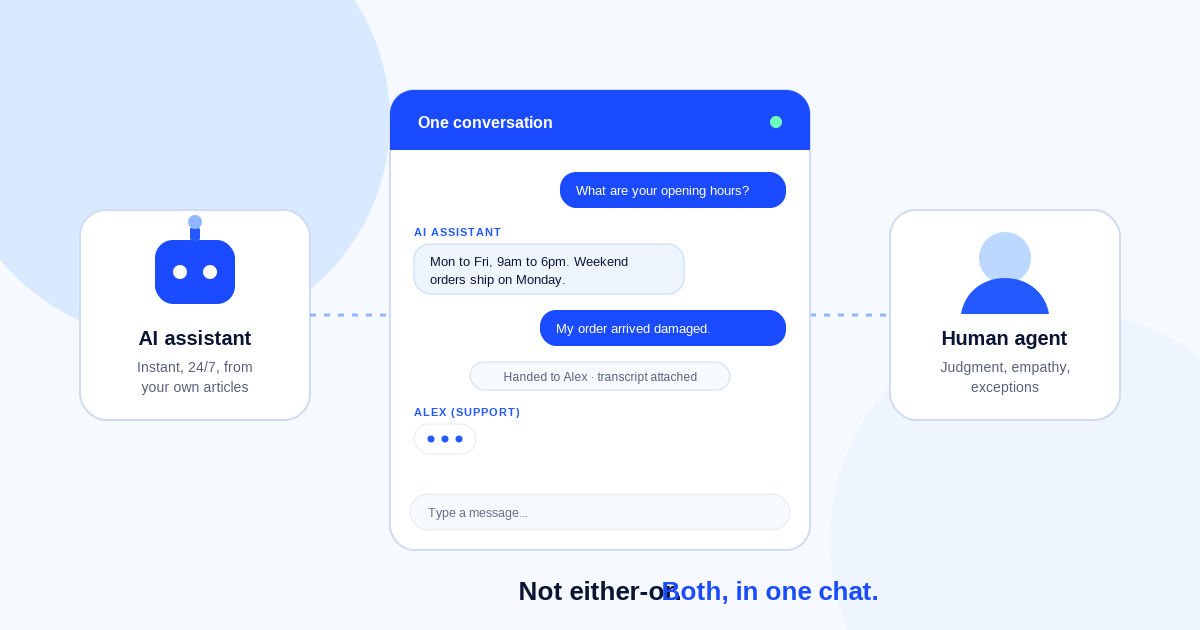
"Should we add a chatbot or just do live chat?" is one of the first questions small teams ask when they put a chat widget on their site. It sounds like a choice between two products. In practice it is a choice about which conversations you want a machine to handle, which ones deserve a person, and how a visitor moves between the two without noticing the seam.
This guide compares an AI chatbot vs live chat honestly, including where each one fails. Then it gives you a decision matrix you can apply to your own top questions, a simple way to think about cost, and a setup for running both together. We make ReplyOnSite, which does both, so we will say where our product fits, but the framework works with any tool.
What each one actually is#
Live chat
Live chat is a real-time text conversation between a website visitor and a person on your team. The visitor clicks a chat button, types a question, and an agent replies from an inbox. Good live chat tools show who is on which page, let agents use saved replies, and let teammates transfer chats or leave private notes.
Rule-based chatbots
The older kind of chatbot follows a script: buttons, menus and keyword rules that you design. "Track an order," "Pricing," "Talk to sales." It is predictable and cheap to run, but it only understands what you anticipated, and visitors who type a free-form question often get stuck in a loop.
AI chatbots
An AI chatbot uses a large language model to understand free-form questions and write replies in natural language. The important distinction is where its answers come from. A well-configured AI assistant answers from your own content: help articles, policies, uploaded documents. A poorly configured one answers from whatever the model happens to know, which is how bots end up inventing refund policies.
AI for agents, not only for visitors
One more distinction is easy to miss. AI does not have to face the customer at all. Copilot features help the person answering: drafting a reply from the transcript and your articles, polishing grammar and tone before sending, summarizing a long conversation for a teammate, or suggesting tags. In that setup every message is still sent by a human, but each one takes less time to write. For teams that are not ready to let a bot talk to customers, this is a low-risk way to start, and it is available in ReplyOnSite's inbox alongside the visitor-facing assistant.
What customers say about bots and people#
Vendor blogs on this topic, including ours, have an obvious interest in the answer. So it is worth starting with independent data. In July 2024, Gartner published a survey of 5,728 customers with a blunt headline result:
64%
of customers said they would prefer that companies didn't use AI for customer service.
Source: Gartner, July 2024 (survey of 5,728 customers) (opens in a new tab)
53%
said they would consider switching to a competitor if they found out a company was going to use AI for customer service.
The most useful part of the Gartner release (opens in a new tab) is not the headline number but the reason behind it. The top concern customers named was that AI would make it more difficult to reach a person, ahead of worries about job losses and wrong answers. Gartner's own advice follows from that: if the AI cannot solve the problem, it should tell the customer it is connecting them to an agent, and then do it smoothly.
Read that carefully and it is less a rejection of AI than a rejection of bad bots: the kind that loop, deflect and hide the human option. Customers want their question answered. They do not mind who answers it, as long as the answer is right and a person is reachable when it is not.
Live chat vs chatbot: pros and cons#
Here is the honest version of each side, without the marketing.
AI chatbot
Pros
- Replies in seconds, at 3 a.m. and on public holidays
- Handles many conversations at once without extra staff
- Consistent: gives the same policy answer every time
- Can reply in the visitor's language
- Frees your team from the same ten questions
Cons
- Only as good as the content it answers from
- Can sound confident when it is wrong if it is not grounded
- Poor at emotion, complaints and judgment calls
- Frustrating when it blocks access to a person
- Needs regular review of questions it could not answer
Live chat with a person
Pros
- Handles nuance, exceptions and unusual requests
- Builds trust, especially before a big purchase
- Can calm an upset customer and recover a sale
- Notices product issues and patterns early
- Customers generally trust people more for advice
Cons
- Limited to the hours someone is available
- Wait times grow when chats arrive at once
- Scaling means hiring and training
- Answers vary between agents
- Repetitive questions burn out a small team
A decision matrix by question type#
The bot-or-human debate gets much easier when you stop asking it about your business as a whole and start asking it about each kind of question. Two things decide the answer: how predictable the question is, and how much is at stake if the reply is wrong or cold.
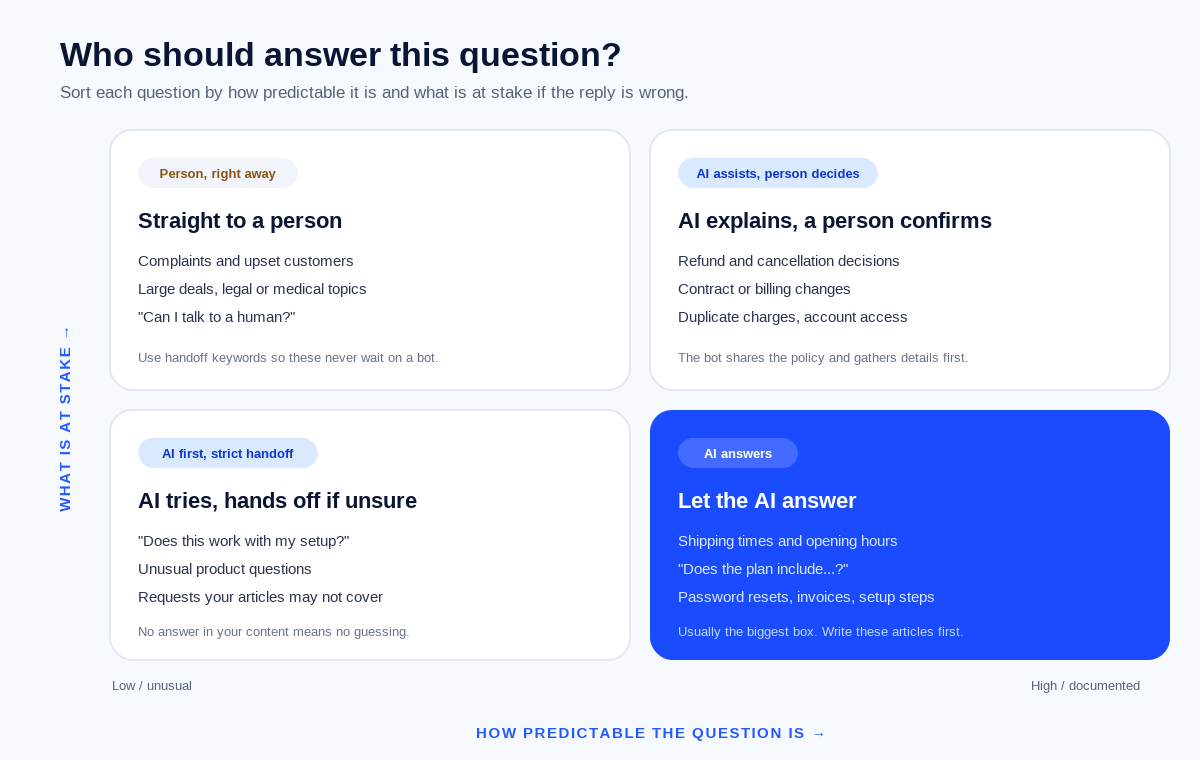
Predictable, low stakes: let the AI answer
Shipping times, opening hours, how to reset a password, whether a plan includes a feature, where to find an invoice. These are the questions that fill an inbox and drain a small team. If the answer is written down somewhere, an AI assistant grounded in that content can answer it instantly and accurately.
Predictable, high stakes: AI assists, a person decides
Refund eligibility, contract terms, anything involving money moving. The answer may be documented, but a wrong reply is costly. Let the bot explain the policy and collect the details, then route the decision to a person. Agents can still use AI here, for example to draft a reply or summarize a long conversation.
Unpredictable, low stakes: AI tries, hands off if unsure
Unusual product questions, "does this work with my setup?" and similar. Let the assistant attempt an answer from your content, but make the handoff rule strict: if it does not find the answer, it says so and passes the chat on instead of improvising.
Unpredictable, high stakes: straight to a person
Complaints, angry customers, large deals, anything legal or medical, and anyone who types "talk to a human." Route these to a person immediately. Handoff keywords exist for exactly this. Our guide to chatbot to human handoff covers the triggers in detail.
The cost question, without made-up numbers#
You will see confident claims online about how much a chatbot saves per conversation. They rarely transfer to a small business, because they come from large contact centers with very different costs. A more useful way to think about it is to compare what each extra conversation costs you.
- Live chat cost grows with people. Each agent can handle only so many chats at once and only during their hours. More volume or longer coverage means more seats and more people. The software is often priced per seat as well.
- AI cost grows with replies. AI tools usually price by conversations, resolutions or replies, so a busy month costs more, but no one has to be awake for it.
- The hidden cost is a wrong answer. A bot that gives a wrong refund answer or traps an angry customer costs more than the reply it saved. That is the real argument for grounding and easy handoff.
To make this concrete with a real price list: on ReplyOnSite's Starter plan ($9.50 a month), you get two agent seats and 500 AI replies per billing month. Growth ($24.50) gives five seats and 2,000 AI replies, and Business ($49.50) gives ten seats and 5,000. Human chat conversations are unlimited on every plan and do not count toward the AI allowance; when the allowance is used up, human chat keeps working. The Free plan has one seat and 50 AI trial replies. Whatever tool you choose, check how it counts AI usage, because "conversations," "resolutions" and "replies" are not the same unit.
A simple test: estimate how many of last month's conversations fell into the "let the AI answer" box. If that number is a meaningful share of your volume, an AI assistant pays for itself in hours you get back, even before you count the after-hours visitors you no longer miss.
How to run a hybrid chatbot and live chat setup#
A hybrid is not two systems glued together. It is one conversation where the visitor gets an instant answer when one exists and a person when it does not. Here is what that looks like:
- Visitor: Can I switch my plan from monthly to yearly?
- AI assistant: Yes. Go to Account, then Billing, and choose Yearly. The change applies at your next renewal. (Source: Changing your plan)
- Visitor: Thanks. Also, I was charged twice this month.
- AI assistant: I am sorry about that. A duplicate charge needs a person to check, so I am connecting you with our team now.
- System: Handed to Sam · transcript attached
- Sam (Billing): Hi, I can see both charges. I have refunded the duplicate; it should appear in 3 to 5 days.
Five decisions make a hybrid work:
- Ground the AI in your content. Write articles for your top questions, and upload the documents you already have. In ReplyOnSite, uploaded PDFs, Word files, text and Markdown become draft articles you review, and the assistant can also learn pages from your website as drafts.
- Make the human option obvious. Handoff keywords such as "agent," "human" or "refund" should route instantly, in every language your visitors use. ReplyOnSite's handoff keywords are multilingual, and the AI replies in the visitor's language across 15 supported languages.
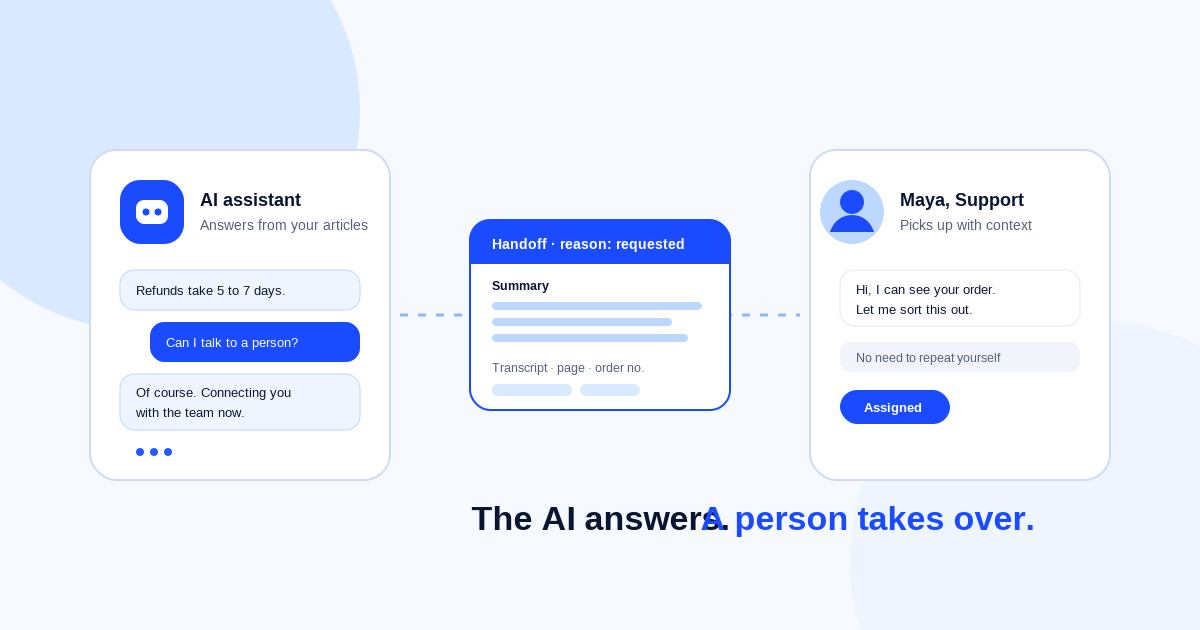
- Pass the context. The agent should see the full transcript, not a blank chat. ReplyOnSite keeps AI and human messages in one transcript, with AI replies tagged so you can audit what was said.
- Decide what happens after hours. Either the AI keeps answering and collects an email for anything it cannot solve, or it creates a ticket. Never leave a visitor in a chat that looks live but is not.
- Close the loop every week. Look at the questions the bot could not answer. ReplyOnSite lists unanswered questions by how often they come up and turns one into a draft article in a click, so the assistant gets better from real demand.
You can also choose when the AI speaks. Some teams let it answer every chat first. Others prefer people during business hours and the AI only when agents are away. Both are valid; start with whichever matches your team's comfort and adjust after a month of data. The AI agent page shows these settings, and the install guide covers getting the widget on your site in the first place.
Mistakes to avoid#
- Launching an AI assistant with no content. An assistant with nothing to ground on will either refuse everything or improvise. Write your top ten articles first.
- Hiding the human. If the only way to reach a person is to argue with the bot, you are building the exact experience customers told Gartner they fear.
- Pretending the bot is a person. Label AI replies clearly. Customers forgive a helpful bot; they do not forgive feeling tricked.
- Letting handoffs go to an empty inbox. A handoff with nobody online needs a fallback: collect an email, create a ticket, and say when the team will reply.
- Never reviewing transcripts. Read a sample of AI conversations every week. It is the fastest way to find missing articles and wrong assumptions.
- Measuring only deflection. A chat the bot "handled" is not a success if the customer left unhappy. Track handoff reasons and satisfaction for AI and human chats side by side.
The verdict: AI chatbot vs live chat#
If you can only staff chat for a few hours a day, an AI assistant grounded in your own content is the single biggest improvement you can make: visitors get answers when they ask, not when you wake up. If your questions are complex, emotional or high value, people remain essential, and no bot should stand between them and your customers.
Before you decide, run through this quick checklist:
- Do you have written answers for your ten most common questions? If not, write them first; both bots and new agents need them.
- How many hours a day can someone realistically watch the inbox? Everything outside that window is a case for AI.
- Which questions must always reach a person? List them and turn them into handoff keywords.
- What happens when a handoff arrives and nobody is online? Decide on an email capture or a ticket.
- Who reviews unanswered questions and AI transcripts each week? Put a name and a day on it.
For most small businesses the answer is not "chatbot or live chat" but "which questions go where." Use the matrix, let the AI take the predictable and low-stakes questions, keep people on the rest, and make the handoff between them seamless. If you are still choosing a tool, our guides on how to add live chat to your website and tawk.to alternatives will help you set it up and compare options.
Frequently asked questions
Is an AI chatbot better than live chat?
Neither is better across the board. An AI chatbot is better for instant, round-the-clock answers to routine questions that your help content already covers. Live chat with a person is better for complex, emotional, high-value or unusual conversations. Most small businesses get the best results from a hybrid where the bot answers first and hands off to a person.
What is the difference between a chatbot and live chat?
Live chat connects a website visitor to a human agent in real time. A chatbot is software that replies automatically, either from fixed rules and buttons or, in the case of an AI chatbot, by generating answers from a language model and your own content. Many products now combine both in one widget.
Do customers prefer talking to a human or a chatbot?
Many still prefer people. In a Gartner survey of 5,728 customers published in July 2024, 64% said they would prefer that companies did not use AI for customer service, and the top concern was that AI would make it harder to reach a person. That is why an easy route to a human matters so much.
When should a chatbot hand off to a human agent?
Hand off immediately when the visitor asks for a person, when the bot cannot find the answer in your content, when the topic is sensitive such as billing disputes or complaints, and when the visitor repeats themselves or shows frustration. The agent should receive the full transcript so the customer never has to start again.
Can a small business afford both a chatbot and live chat?
Yes. Many tools bundle both. ReplyOnSite's Free plan includes live chat for one agent and 50 AI trial replies, and paid plans start at $9.50 a month with a monthly AI reply allowance. Human chat conversations do not count toward the AI allowance.
Will an AI chatbot make up answers?
A general-purpose AI model can produce confident but wrong answers. The safeguard is grounding: instructing the assistant to answer only from your own articles and documents, and to say so and escalate when the answer is not there. Review the questions it could not answer and add articles for them.
What is a hybrid chatbot and live chat setup?
A hybrid setup uses one chat widget where an AI assistant answers routine questions instantly and a human agent takes over when needed, with the conversation history attached. Outside business hours, the bot keeps answering and collects contact details or creates a ticket for anything it cannot resolve.
ReplyOnSite
Answer every visitor. Hand the hard ones to a person.
Live chat, an AI assistant grounded in your own content, and WhatsApp, Messenger, Instagram and Telegram in one inbox. The Free plan needs no card.
Keep reading
AI support
Chatbot to Human Handoff: How to Build AI Customer Support That Knows When to Step Aside
The triggers, rules and context that turn an AI assistant from a wall between you and your customers into a fast first line with a person right behind it.
11 min read
Guides
How to Add Live Chat to Your Website: A Step-by-Step Guide for 2026
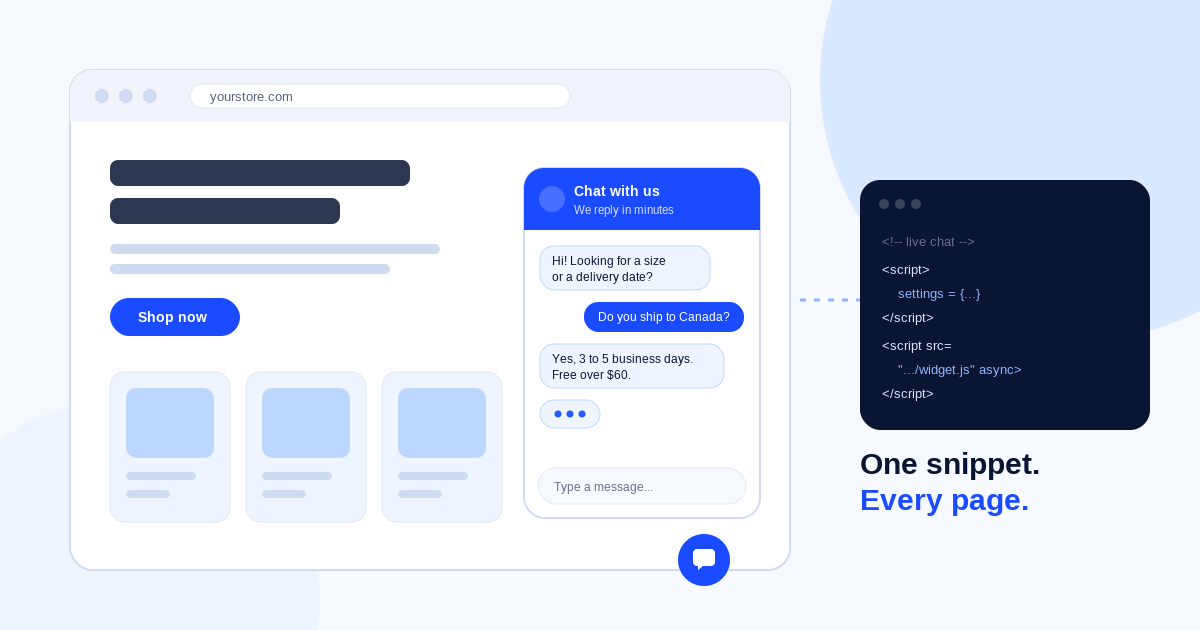
One script tag, the exact place to paste it on every major platform, and the settings to get right before your first visitor says hello.
11 min read
Comparisons
tawk.to Alternatives in 2026: 5 Honest Options Compared (Free and Paid)
A short, fair comparison built from public pricing pages: what tawk.to does well, five alternatives, who each one fits, and how to switch without losing anything.
10 min read